



The 2026 GMC Acadia technology setup pushes far beyond larger screens and added alerts, bringing together radar monitoring, camera visibility, connected navigation, and integrated cabin controls that change how drivers interact with a midsize SUV. Acadia shoppers are looking for more than a feature list. They want to know how the safety tech reacts, how the infotainment layout works while driving, and what to evaluate before choosing a trim.
GMC Safety Assist Monitoring
What does GMC Safety Assist monitor while driving? GMC Safety Assist is a collection of driver assistance features that uses sensors, cameras, and software logic to watch for lane position, vehicles ahead, potential front end collision risk, and pedestrian movement within monitored areas.
In the 2026 GMC Acadia, this matters because the SUV’s size, seating layout, and family focused cabin create more situations where awareness tech needs to process information quickly. Forward collision alerts rely on front facing detection to watch closing speed between the Acadia and traffic ahead. If the closing gap gets too short, the alert logic warns the driver before braking distance becomes tighter.
Lane assistance works differently. Instead of watching traffic ahead, the camera reads visible lane markings and compares the Acadia’s position against those markings. If the SUV begins to drift without a turn signal, the steering assist can provide gentle correction. Buyers should evaluate how these alerts feel during a test drive, because the best safety setup is one the driver understands and trusts.
The 2026 GMC Acadia technology story begins with that trust. Safety features should not feel mysterious. They should give drivers clearer feedback about what the SUV is reading and why an alert appears.
Adaptive Cruise Control and Lane Technology
How does adaptive cruise control react in traffic? Adaptive cruise control uses forward monitoring to maintain a selected speed while adjusting distance from the vehicle ahead. The Acadia’s control logic reads closing speed, gap distance, and traffic flow before easing off throttle or applying braking.
This feature has a direct role for Acadia drivers who spend time on Baton Rouge highways, school routes, and longer Louisiana drives. When traffic slows, adaptive cruise control reduces speed without the driver needing to cancel cruise control. When the lane clears, the SUV can accelerate back toward the selected setting.
Lane technology adds another layer. The Acadia’s lane assistance is not meant to replace steering input. It works as a corrective support feature when visible lane markings are present and the SUV begins moving away from its lane path. The driver still remains responsible for steering, braking, and roadway judgment.
Shoppers should pay attention to three things during evaluation:
• How smoothly adaptive cruise control slows the Acadia in traffic
• How clearly lane alerts communicate lane drift
• How easy it is to adjust following distance settings
These details matter because driver assistance tech is only useful when it feels predictable. A large SUV with advanced alerts should still feel natural from the driver’s seat, not overly busy or hard to interpret.
Infotainment Architecture and Google Built In
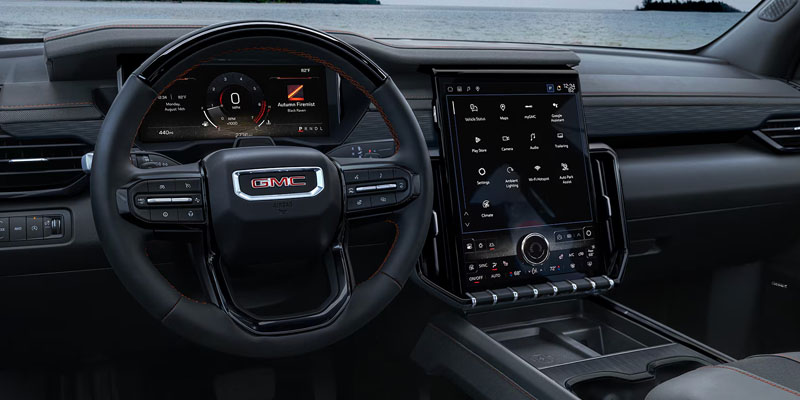
Why are larger infotainment displays changing SUV interiors? A larger infotainment display changes how navigation, audio, climate access, smartphone tools, and camera views are organized inside the cabin. The display becomes the command center, so layout logic matters as much as screen size.
The 2026 GMC Acadia technology package includes infotainment tools built around visibility, touch access, and connected services. Google built in changes the interaction model because navigation and voice commands can run through the vehicle interface rather than relying only on a connected phone. That can make route guidance, search, and voice requests feel more integrated with the SUV’s own display.
The technical value comes from reduced task switching. When maps, audio, phone access, and vehicle settings live in a clear interface, the driver spends less time hunting through menus. Screen size can help, but only when the layout is clean enough to use while parked, before driving, and during quick stops.
Acadia shoppers should evaluate the infotainment setup by testing simple tasks. Pair a phone, start navigation, change audio, pull up camera views, and adjust common settings. Those actions reveal more about the interface than a spec sheet can.
Family Connectivity and Display Layout
What should families evaluate in connected cabin technology? Connected cabin technology refers to how screens, charging access, voice controls, smartphone mirroring, and passenger needs work together during everyday trips.
The Acadia is built for households that may have multiple phones, frequent navigation needs, child passengers, work calls, sports bags, and weekend gear all inside the same cabin. Wireless Apple CarPlay and Android Auto matter because cable free startup can reduce the small frustrations that happen before every drive. Once paired, the phone interface can bring maps, calls, messages, and music into the main display.
Display layout also matters for families because the driver should not need to dig through menus while passengers are talking, routes are changing, or stops are being added. A good cabin tech setup keeps common controls easy to find and separates high attention tasks from simple adjustments.
Before choosing a 2026 GMC Acadia, shoppers should look at:
• Wireless phone pairing speed
• Charging access for front and rear passengers
• Visibility of navigation prompts from the driver’s seat
• Ease of switching audio sources
• Voice command accuracy for common requests
The buyer implication is simple. Cabin tech should reduce friction before and during the drive. If the interface feels logical during a short test drive, it is more likely to support busy family routines without adding confusion.
Camera Visibility Technology
How does surround vision create overhead visibility? Surround vision uses multiple exterior cameras to capture different angles around the SUV, then software blends those views into a single composite image that resembles an overhead view.
For the Acadia, this is important because midsize SUV drivers need to judge curbs, parking lines, tight driveways, nearby vehicles, and low obstacles that may sit outside direct sightlines. The camera view does not replace mirrors or turning your head, but it adds another layer of spatial awareness when moving at low speeds.
The technical process relies on camera placement and image stitching. Each camera sees a different zone around the SUV. The software maps those camera feeds together so the driver can understand position relative to objects nearby. When paired with parking alerts, the driver gets both visual information and distance feedback.
Shoppers should evaluate camera clarity in daylight, shadow, and tight parking spaces. They should also check how quickly the view appears when shifting into reverse and how easy it is to switch angles. For larger SUVs, camera quality can shape daily confidence during parking, garage entry, and crowded lots.
What the 2026 GMC Acadia Technology Setup Means for Buyers
The strongest technology features in the 2026 GMC Acadia are not isolated gadgets. They work best when safety alerts, driver assistance, infotainment, phone pairing, navigation, and camera views support the way the SUV is driven each day.
A shopper comparing midsize SUVs should move past screen size and feature names. The better evaluation is how well the Acadia communicates information. Safety alerts should be clear. Adaptive cruise control should feel smooth. The infotainment display should make common tasks easy. Camera views should make parking and positioning easier to judge.
For buyers near Ross Downing GMC, the 2026 GMC Acadia technology setup is worth testing in person because the feel of the interface matters. A test drive can show how the display responds, how driver assistance features communicate, and how connected tools fit the way the SUV will be used.
Connect with us


